Getting Started
Everything you need to know to begin your COI Orb journey — from understanding the platform to meeting COI and finding your way around.
What is COI Orb?
COI Orb (PCAI) is a compassionate, AI-powered platform designed to support individuals and families navigating palliative, chronic, and serious illness journeys. Unlike clinical tools that focus solely on medical data, PCAI takes a whole-person approach — addressing emotional well-being, spiritual comfort, family connection, and daily living alongside health tracking. The platform was built with deep empathy for the unique challenges faced by older adults, caregivers, and healthcare teams.
At its core, PCAI provides a safe, private digital space where a Circle of Care — the person, their family, caregivers, and clinical team — can coordinate support. Whether someone is living with dementia, recovering from a stroke, managing heart failure, or facing any serious condition, PCAI adapts its interface, content, and interactions to meet each person where they are. The platform supports multiple languages including English, French, and Tagalog, ensuring accessibility for diverse communities.
PCAI is not a medical device and does not replace professional healthcare. Instead, it sits alongside clinical care as a wellness companion that helps reduce isolation, improves communication between care partners, and provides daily comfort through music, devotion, memory exercises, and gentle AI conversation. Every feature is designed with the understanding that the person using it may be elderly, visually impaired, or cognitively challenged — which is why accessibility and simplicity are at the heart of everything we build.
Creating Your Account
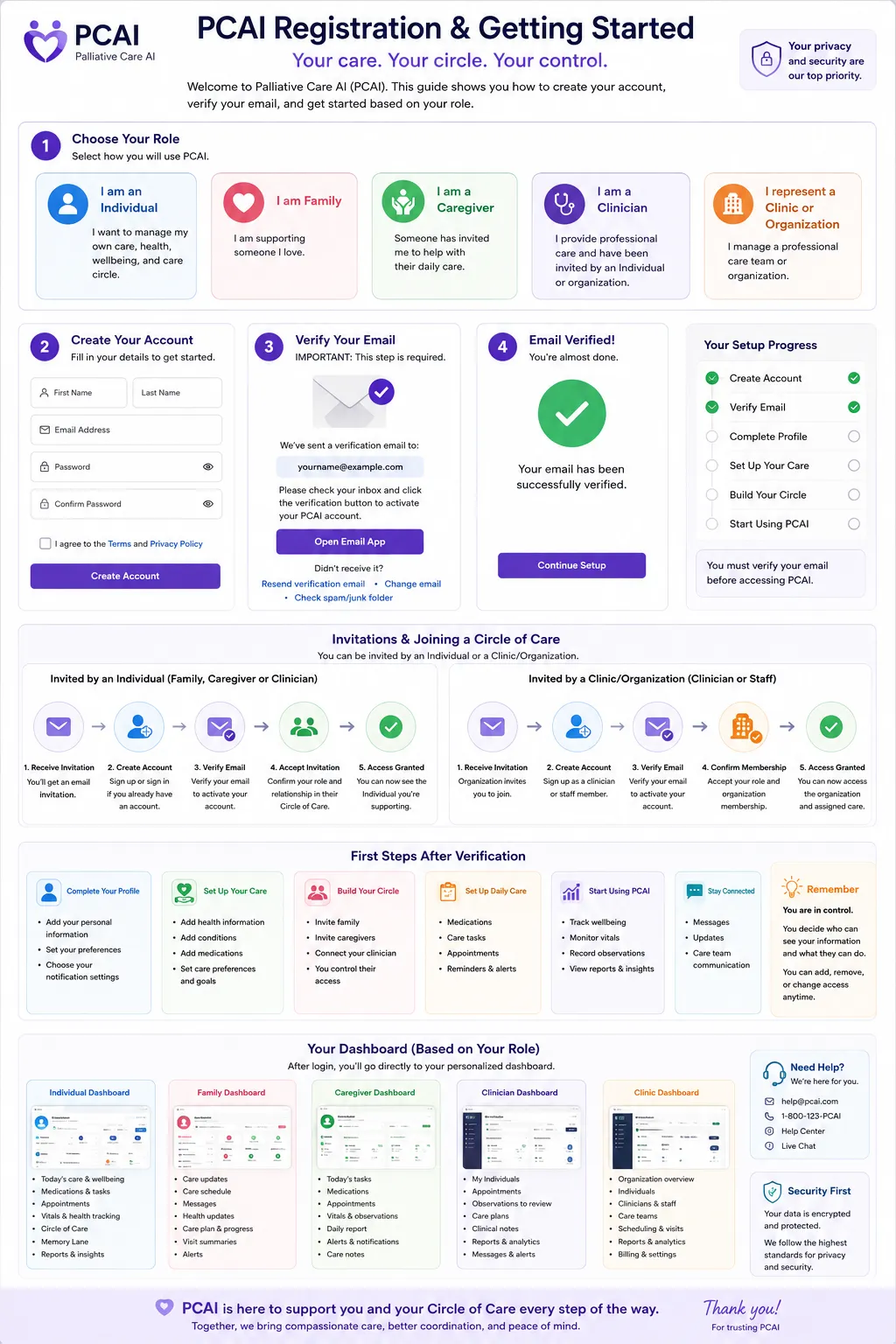
Getting started with COI Orb is straightforward and takes just a few minutes. Visit coiorb.com and click the "Get Started" button on the homepage. You will be asked to provide your email address and create a secure password. We recommend choosing a password that is easy for you to remember but hard for others to guess — a favorite phrase or a combination of words that means something personal to you.
After entering your email and password, you will receive a confirmation email. Open this email and click the verification link to activate your account. If you do not see the email within a few minutes, check your spam or junk folder. Once verified, you can sign in and begin the onboarding process, which helps PCAI understand your needs and preferences so the platform can be personalized for you from the very first day.
If you are setting up an account on behalf of a loved one — such as a parent or grandparent — you can do so using your own email and then invite them as a Member of your Care Circle later. This is a common pattern for family caregivers who want to configure the platform before introducing it to the person they care for. There is no limit to how many people can be part of a single Care Circle, and each person has their own role and permissions.
The Onboarding Experience
After signing in for the first time, PCAI guides you through a gentle onboarding flow. This is not a technical setup wizard — it is a conversation. The onboarding asks about your role (whether you are a Member, Family member, Caregiver, or part of a Clinic), the primary condition or reason for using the platform, and what matters most to you or the person you are supporting. This information helps PCAI customize the dashboard, suggest relevant modules, and set the right tone for every interaction.
The onboarding process is designed to be completed in about five to ten minutes. Each screen has large, clear text and simple choices. You can always skip a question and come back to it later from your account settings. If you are a caregiver or family member setting up on someone else's behalf, the onboarding will ask about the person you are supporting — their comfort level with technology, their primary language, and any specific accessibility needs such as larger text, higher contrast, or simplified navigation.
Once onboarding is complete, PCAI generates a personalized dashboard with the most relevant modules, a welcome message from COI, and suggestions for next steps. You can revisit and change your onboarding answers at any time through the Settings page. The platform is designed to grow with you — as needs change over time, PCAI adapts accordingly.
Meeting COI — Your Compassion Orb Intelligence
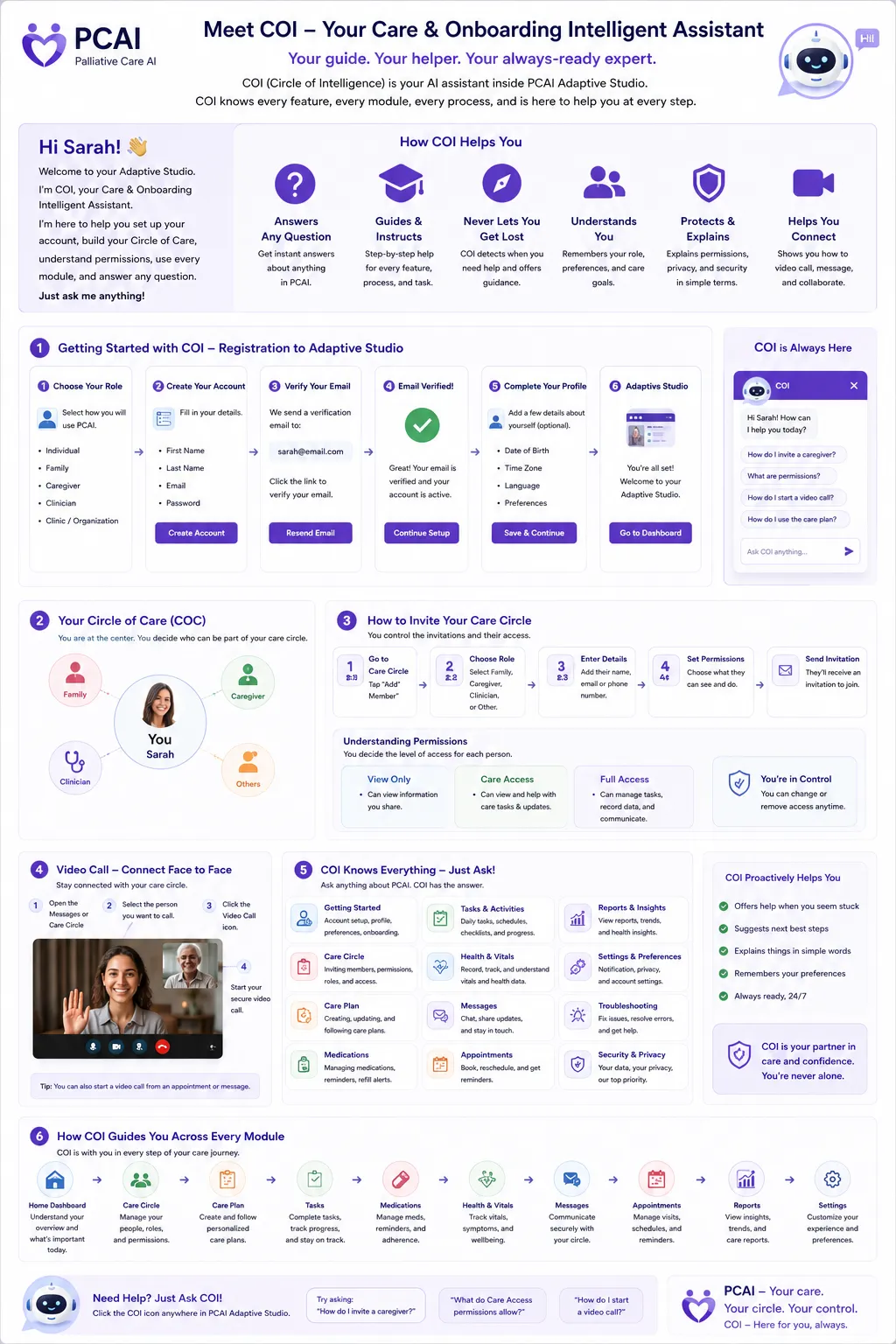
COI (pronounced "Koy") is the heart of COI Orb. COI stands for Compassion Orb Intelligence — a calm, gentle AI companion that sits at the center of your home screen. Think of COI as a warm, patient presence that is always there when you need it. You can talk to COI using your voice or by tapping COI and typing. COI can answer questions, play music, guide you through breathing exercises, read daily devotionals, tell you the weather, and provide gentle reminders.
COI has 12 different modes that adapt to what you need in the moment. These include Companion mode for friendly conversation, Comfort mode for distress and anxiety, Memory mode for reminiscence exercises, Devotion mode for spiritual comfort, and more. COI automatically suggests the most appropriate mode based on the time of day, your recent interactions, and any information your care circle has shared. You can also manually switch modes by tapping COI or using a voice command like "COI, switch to comfort mode."
It is important to understand that COI is not a doctor, nurse, or medical device. COI is a non-clinical wellness companion. COI will never diagnose a condition, prescribe medication, or give medical advice. If you ask a medical question, COI will gently direct you to your care team or suggest contacting a healthcare professional. COI's purpose is to provide emotional support, daily comfort, and a sense of connection — especially during moments when a human companion may not be available.